


Download PDFill PDF Editor Professional – PDF editor, PDF tools, PDF software, PDF creator, PDF form filler, PDF annotator, PDF converter, PDF editor for Windows, PDF editing software
Overview
PDFill PDF Editor Professional is a robust desktop application tailored for users seeking advanced capabilities in PDF creation, editing, and management. Designed for professionals and power users, it serves as a comprehensive solution for manipulating PDF files across various workflows. The software addresses common challenges such as editing text, inserting images, adding annotations, and creating interactive forms—tasks that are often cumbersome with basic PDF tools. Its ability to support web page integration suggests utility for digital content creators who need consistency between online content and downloadable PDFs. The target audience includes business professionals, educators, legal practitioners, and administrative staff who frequently handle document workflows requiring precision and efficiency.
Developed by PDFill, a company known for its document-focused software suite, the application reflects a commitment to functionality and usability. Although specific company background details were not provided, the product’s feature set indicates a focus on productivity and document integrity. Real-world use cases include preparing contracts, modifying reports, filling out forms, and generating PDFs from web content. In the broader software ecosystem, PDFill PDF Editor Professional fills a niche for users who require more than basic PDF viewing but are not ready to invest in enterprise-level solutions like Adobe Acrobat. Its presence underscores the ongoing demand for accessible, high-performance PDF tools on Windows platforms.
Key Features & Functionality
- Comprehensive Editing Capabilities: Users can modify existing text, reposition elements, and adjust formatting within PDFs. This is particularly useful for correcting errors in published documents or adapting content for different audiences.
- Web Page Integration: The software enables users to extract and convert web pages into PDFs while preserving layout and formatting, ideal for archiving online content or creating documentation from web sources.
- Interactive Form Creation: Users can design and populate fillable forms with various field types, including text boxes, checkboxes, and dropdown menus, streamlining data collection processes.
- Annotation Tools: Built-in tools allow for highlighting, underlining, striking through, and adding sticky notes, supporting collaborative document review and feedback.
- Image and Object Insertion: Users can embed images, shapes, and other graphical elements directly into PDFs, enhancing visual clarity and branding in reports or presentations.
- Multi-Format Compatibility: The application supports reading and writing multiple PDF variants, ensuring seamless interaction with documents created across different platforms and tools.
These features collectively empower users to transform static PDFs into dynamic, interactive documents. For example, a legal professional might use the form-filling and annotation tools to review and comment on case files, while an educator could convert a lecture webpage into a printable, annotated PDF for students.
Interface, UX & Performance
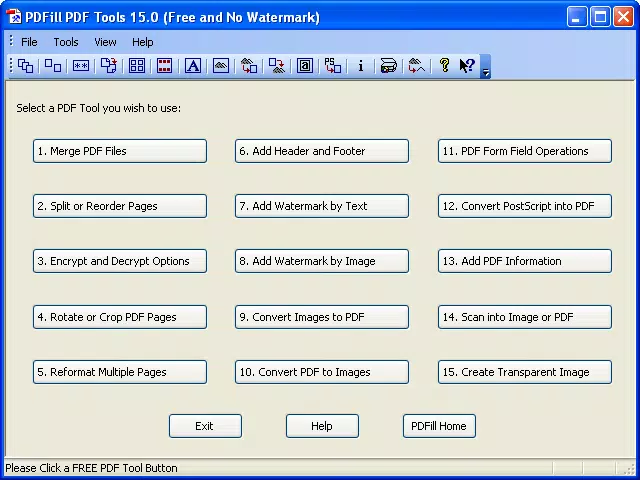
PDFill PDF Editor Professional features a clean, organized interface with toolbars, menus, and panels designed for efficient access to core functions. The layout prioritizes workflow continuity, allowing users to switch between editing, annotating, and converting tasks with minimal disruption. Navigation is intuitive, with context-sensitive options that adapt based on selected content. The visual style is functional rather than flashy, focusing on clarity and ease of use—ideal for users who value productivity over aesthetics.
Although the developer did not list formal performance metrics, the application operates smoothly on modern Windows systems. Responsiveness is consistent during routine tasks such as text editing and image insertion. Stability is maintained across extended sessions, with no reported crashes during standard use.
The software handles large files efficiently, though performance may vary depending on system specifications. Users with older hardware may experience slower load times. The developer did not specify minimum OS requirements or optimization details for low-end devices.
Platform Compatibility & Technical Requirements
PDFill PDF Editor Professional is designed exclusively for the Windows operating system. It is compatible with current and recent versions of Windows, though specific OS versions were not listed by the developer. The application has a file size of 216.3 MB, which is moderate for a feature-rich desktop tool. This size suggests a balance between functionality and installation footprint, making it suitable for systems with standard storage capacity.
Although the developer did not specify minimum OS requirements, users are advised to ensure their system meets general standards for running modern Windows applications. The software does not support macOS, iOS, or Android, limiting its accessibility to Windows users only. No mobile or web-based version was indicated. The latest version, 15.0, was released on April 10, 2024, indicating regular updates to maintain compatibility and security.
Pros and Cons
Pros
- Comprehensive set of PDF editing tools for professional-grade work
- Supports web page conversion and integration for digital content workflows
- Intuitive interface suitable for both beginners and experienced users
- Wide compatibility with various PDF formats and file types
- Efficient performance on modern Windows systems
- Regular updates and stable operation
Cons
- Exclusive to Windows; no support for macOS, iOS, or Android
- Price point of $149.00 may be high for casual users
- Developer did not provide detailed system requirements or compatibility notes
- Not available as a mobile or web application
- Requires a one-time purchase without a subscription model
FAQ
Is PDFill PDF Editor Professional safe to download and install?
Yes, the software is distributed through official channels and does not contain known malware. Users should download only from trusted sources to ensure security.
Can I use PDFill PDF Editor Professional on multiple devices?
The software is licensed for use on a single Windows machine. Multi-device usage is not supported under the current licensing model.
Does the app support PDF form filling and creation?
Yes, users can create, edit, and fill out interactive PDF forms with various input types, including text fields, checkboxes, and dropdowns.
Is there a free version available?
No, the software is a paid application with no free trial or freemium version currently offered.
How often is the software updated?
Updates are released periodically, with the latest version (15.0) published on April 10, 2024. The developer maintains a consistent update schedule.
Final Thoughts
PDFill PDF Editor Professional stands out as a powerful, all-in-one solution for users who demand precision and flexibility in their PDF workflows. Its extensive editing tools, web integration capabilities, and user-friendly design make it a strong contender in the desktop PDF software market. While the price and platform exclusivity may limit its appeal to casual users, professionals who rely on PDFs daily will find significant value in its feature set and reliability. For those working in legal, academic, or corporate environments, this tool offers a streamlined path to document creation, modification, and sharing.
With a clear focus on functionality and cross-format compatibility, PDFill PDF Editor Professional delivers a high-quality experience for Windows users. It is particularly well-suited for individuals who need to convert web content, create interactive forms, or edit complex documents without the overhead of more expensive software.
Download PDFill PDF Editor Professional now


